Deadlock in Operating Systems


Deadlock


                                In an operating system deadlock arrived when two or more process want to access the same resource (resource may include processors, memory, network modem, printers and files etc.)  To compete their task or action.
Or when two or more process waiting for each other to complete is called a deadlock situation.
For example:
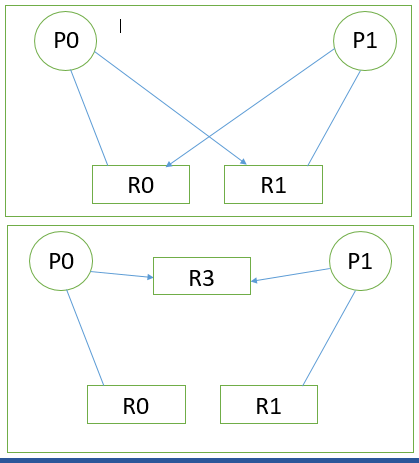
Process P0 using resource R0 and it need resource R1 to complete its task but at the same time another process P1 is using resource R1 and it need the resource R0 which is currently acquired by P0 to complete its own action so both processes wait for each other to complete their task and they keep waiting for life time because no one can complete its action. So we can say that the both processes are in deadlock situation.
As you can see in the figure given below.


Conditions when deadlock occur:


·         At one time a single process can use the a resource (Mutual Exclusion)
·         A process holding a resource and also waiting for another resource which is currently in use of other process (Hold and Wait)
·         A process can release resource when it completes its execution (No Preemption)
·         When two or more processes waiting for one another to release the resource so they can complete their task.

Solutions:


                                There are three method to get rid of deadlocks

Deadlock prevention:


                                                                In this method it is ensured in the Operating system that system will never enter in deadlock situation.
Every process have access to the shared resource at the same time but not for the unshared resources,
Make sure when a process request for a resource it is not holding any other resources. Process must request for resource and be allocated before start its execution. Or allow the process to request for resource when it has no resource allocated.
If a process request for resources and currently holding some resources then cannot allocate the new resource until it release the currently holding resources.
Restart the process when it regain the old resource and the new one which was requested. Each process must request for resources in increasing order.
Preempted resource should be added in to the required resources list for which process are waiting.

Deadlock avoidance:


Ignore the deadlocks and pretend that deadlock never occurs in the system. Most of the operating system use this method including UNIX.
This method need some prior information available about the processes and the resources.
In this each process which is currently loaded declare the maximum number of resource which required by the process to complete its task. Algorithm for deadlock avoidance check for resources allocation to ensure that there is no process waiting for the resource which is currently in use or it ensure that there is no circular waiting of processes. Maintains a state of available resource and allocated resource, and also keep the record of resourced demand by the processes.


Deadlock detection:


                                                                Allow the system to go in the deadlock situation and then recover the system from deadlock using different algorithms.
First allow the system to enter in a deadlock state then define some detection algorithms to detect the deadlock in the system, and make a recovery scheme to recover the system from deadlock condition.
To recover the system from a deadlock state select a victim and reclaim the resource, or roll back the process which is most recently started.

Deadlock recovery:

                                                                If deadlock is occurred now what steps we should take.

Process termination:

·         Delete all the process which are in deadlock condition but is expensive.
·         Delete one by one process until the deadlock is broken.
·         Select a process which is recently start and terminate it.

Resource preemption:

·         Select a resource to preempt.
·         Roll back to a previous safe state.
·         Prevent the one process which is always selected as a victim.

System States:


·         Safe state
·         Unsafe state
·         Deadlock state
System can be in one of the states given above.

Safe state:


                                A system is in a safe state if all the process are in a sequence and resource required by a process are available at the time and not in use of any of the other process. When a process request for the resources system must check that after the allocation of these resource system can remain in safe state.
If a process need a resource which is currently in use so this process can wait until the process release the required resource.
If a system is in safe state that means there is no deadlocks.

Unsafe state:

                                A system is in unsafe state when there is a chance of the occurrence of deadlock or resources allocated which is currently in use of some other processes.

Deadlock state:


                                System in deadlock state when two or more process want the same resources or two or more process waiting for each other to complete their tasks.

Cache Memory

What is Cache Memory ?


cache memory, also called Cache,  a supplementary memory system that temporarily stores frequently used instructions and data for quicker processing by the central processor of acomputer. The cache augments, and is an extension of, a computer’s main memory. Both main memory and cache are internal, random-access memories (RAMs) that use semiconductor-based transistor circuits. Cache holds a copy of only the most frequently used information or program codes stored in the main memory; the smaller capacity of the cache reduces the time required to locate data within it and provide it to the computer for processing.
When a computer’s central processor accesses its internal memory, it first checks to see if the information it needs is stored in the cache. If it is, the cache returns the data to the processor. If the information is not in the cache, the processor retrieves it from the main memory. Disk cache memory operates similarly, but the cache is used to hold data that has been recently written on, or retrieved from, a magnetic disk or other external storage device.

Computer Main Memory And Its Types


Computer Memory

MEMORY IS THE INTERNAL STORAGE AREA OF THE COMPUTER. MEMORY IDENTIFIES THE DATA STORAGE.THE PHYSICAL MEMORY USUALLY REFERRED TO US MAIN MEMORY OR RAM.


TYPES OF MEMORY

  • RAM

  • ROM

RAM

RAM STANDS FOR RANDOM ACCESS MEMORY.IT WRITE DATA INTO RAM AND ASLO READ DATA FROM RAM. RAM IS A VOLATILE MEMORY.IT HOLDS DATA AS LONG AS THE COMPUTER IS SWITCHED ON.THERE ARE TWO TYPES OF RAM

  • DRAM

  • SRAM

  • DRDRAM

DRAM

DRAM STANDS FOR DYNAMIC RANDOM ACCESS MEMORY. MOSTLY USED IN PERSONAL COMPUTERS.DRAM MUST HAVE ELECTRIC CURRENT TO MAINTAIN ELECTRICAL STATE(REFRESH).ITS ACCESS TIME IS 60 - 70 NAN0SEC0NDS.


SRAM

SRAM STANDS FOR STATIC RANDOM ACCESS MEMORY.ITS ACCESS TIME LESS THAN 60 NAN0SECONDS.


DRDRAM

DRDRAM STANDS FOR DIRECT RAMBUS DYNAMIC RANDOM ACCESS MEMORY.IT IS THE NEW TYPE OF RAM. IT ACCESS TIME 20 TIMES FASTER THAN DRAM.


ROM

ROM STANDS FOR READ ONLY MEMORY.IT IS A NON-VOLATILE MEMORY.IT READ DATA FROM MEMORY.

TYPES OF ROM

  • PROM

  • EPROM

PROM

PROM STANDS FOR PROGRAMMABLE READ ONLY MEMORY. IT ACTS LIKE A ROM. THERE ARE TWO TYPES OF PROMS.

  • EPROM

  • EEPROM

EPROM(ERASABLE)

EPROM STANDS FOR ERASABLE PROGRAMMABLE READ ONLY MEMORY. IT CAN BE ERASED AND REPROGRAMMED BY THE USER.


EEPROM(NON ERASABLE):

EEPROM STANDS FOR ELECTRICALLY ERASABLE PROGRAMMABLE READ ONLY MEMORY.NONERASABLE PROMS CANNOT BE CHANGED ONCE THEY ARE PROGRAMMED.

Operating system architecture


The computer architecture of a computing system defines its attributes as seen by the programs that are executed in that system, that is, the conceptual structure and functional behavior of the machine hardware. Then, the computer architect defines the functions to be executed in the hardware and the protocol to be used by the software in order to exploit such functions. Note that the architecture has nothing to do with the organization of the data flow, the logical design, the physical design, and the performance of any particular implementation in the hardware.
      Hence By Architecture we mean the order in which certain hardware Processes are carried out by the OS and has nothing to do with the logical software flow of the Computer.

Simple view

An Operating System is the layer between the hardware and software, as in


An Operating System is responsible for the following functions
  • Device management using device drivers
  • Process management using processes and threads
  • Inter-process communication
  • Memory management
  • File systems
In addition, all operating systems come with a set of standard utilities. The utilities allow common tasks to be performed such as
  • being able to start and stop processes
  • being able to organise the set of available applications
  • organise files into sets such as directories
  • view files and sets of files
  • edit files
  • rename, copy, delete files
  • communicate between processes

Kernel

The kernel of an operating system is the part responsible for all other operations. When a computer boots up, it goes through some initialisation functions, such as checking memory. It then loads the kernel and switches control to it. The kernel then starts up all the processes needed to communiate with the user and the rest of the environment (e.g. the LAN)
The kernel is always loaded into memory, and kernel functions always run, handling processes, memory, files and devices.
The traditional structure of a kernel is a layered system, such as Unix. In this, all layers are part of the kernel, and each layer can talk to only a few other layers. Application programs and utilities live above the kernel.
The Unix kernel looks like Unix kernel
Most of the Operating Systems being built now use instead a micro kernel, which minimises the size of the kernel. Many traditional services are made into user level services. Communication being services is often by an explicit message passingmechanism.
The major micro-kernel Operating System is Mach. Many others use the concepts of Mach.Mach kernel
Some systems, such as Windows NT use a mixed approach NT kernel